Dear Readers: HWS has recently started a new project for the students of engineering ====> The Engineering Projects


Write at HWS !!!

Guest Posting

How secure is your Computer ?

Check out your computer safety here . A lot of tools , tricks and hacks related to computer .

Blogger Tips and Tricks

A Lot of tips ,tricks and hacks related to blogger . Seo tricks to get maximum targetted traffic to your blog.

Easy ways to Earn Online

Online earning is not so difficult but it needs a lot of patience and hardwork. Here are some techniques to earn money through internet.

Facebook Tricks

A lot of facebook tips , tricks and hacks.It requires a lot of time but reading is must.

Pro Hacking

If you have knowledge about basic techniques then try this,but be careful as it is highly toxic.

Sunday, December 19, 2010

How to hide sensitive data - Steganography

How to hide data

There are many ways we hide our data in computer some people use encryption tools like Truecrypt, some hide there files in folders , some use folder lock etc.”Steganography “ ,I cannot say it as a new concept but it different from others(mentioned above)and has a wide range of application. Here I will discuss few basics aspects of this technique with few freeware tools for Windows OS available online

What is Steganography?

It is the art of hiding data or message in another file invisible to a targeted mass of people. Mostly people have a wrong concept that steganography is related to images only i.e. hiding messages in images only but actually that is not the case it can be done in other file formats also .We can also hide .RAR file in .DOCX formats etc.

  •  Carrier file(Size:23kb) + Message = Stego File(Size:More than 23kb)

As mentioned above “Carrier file” is the file where we can hide the message or data, after that as you can see above the size of the file has increased .

Applications of Steganography

  • This techniques is believed to be used by terrorists for sending confidential messages.
  • Used by intelligence agencies for sending confidential data.
  • Used by some website owners for marking their images.
  • Used in digital water marking images.
  • Used in laser printers for hiding the serial no of printers.
You can find wide range of Steganography Tools here for download

Procedure:

Here I will use few tools and commands to demonstrate the basics of steganography :

Method 1

  • Step 1.
Open up command prompt from the start button on the taskbar.

  • Step 2
Suppose you have an image file Compufreaks.jpg (carrier file) and you want to hide a file called RHA.rar(message) in that.

  • Step 3.
You have to keep both the files in the same folder and change the path of the drive to that folder in command prompt.

  • Step 4
Then use the command ”copy /b Compufreaks.jpeg+RHA.rar Secret.jpeg “ and check the size of the files as shown below, now you have sucessfully hided computerfreaks.jpeg in to RHA.rar

How to hide data

Method 2

The tools we will be using here is Jphs_0.5. 
  • Step 1
Having downloaded the required files open up Jphs_0.5.(click on Jphswin.exe) in the extracted folder.

  • Step2
Click on the “open jpeg” on the top menu and browse to find the required file and click open.

  • Step 3
Now click on hide on the top and enter the password then click ok to select the required message file and save it.

How to hide data


How to Detect Hidden messages?


The method of detection of hidden message in a steganographically encoded file is known as Steganalysis.Here I will bring out few of the basic techniques of steganalysis.

  • Requirements

a) Stegdetect_0.4
b) Wordlist file
c) Rules.ini file

Method 1

  • Step 1

Once you have downloaded the required file , now open up command prompt and change the path where you have downloaded Stegdetect_0.4(extracted).

  • Step 2

Now put the required steganographically encoded file(Secret.jpg) generated from method 2.above in that folder where you have exracted Stegdetect_0.4.

How to hide data

  • Step 3
In the command prompt use the command stegdetect –t p secret.jpg and hit enter,then it will show the show the steganography tool used and password as <******>.
  • Step 4
Now use the command stegbreak –r rules.ini –f words.txt –t p secrect.jpg and hit enter it will show the password and no . of embeddings.


Note:Always use the extension of the required file in the above command.

  • Step 5

Having know the password open the file using Jphs_0.5 and then click seek on the top menu use the password (retrieved above) and save the file in the format of the data file.

Method 2

There is an online tool available called Mozaiq which does all the work that I described in method 1. above.
Then you can use Mozaiq Decrypt for decrypting the steganographically encrypted file .

Certianly steganography is really a vast topic of discussion ,here I have tried to bring out few essential aspects of it .Hope you like it.

If you find this article worth reading then do drop a comment,it will be appreciated.
How to make money online with adbrite

This summary is not available. Please click here to view the post.

Best social networking sites

Today my post will be on Top "Best social networking sites"Social networking sites are doing more than one another to get on the top


Here is the list of some Popular and well know social networking sites and information on them:


Facebook
With Facebook officially turning five years old recently, combined with the site surging past MySpace in Monthly Unique Visitors, it seems like a good time to take a little deeper look at the social networking giants.

It’s hard to believe that last year around this time we discussing the effects of bad PR for Facebook and if the site had ‘jumped the shark,’ but those arguments now seem to more appropriately apply to other properties.Facebook has now became the largest social networking site in 2009.Ranked at number 4th spot according to Alexa
Orkut:
A social networking site sponsored by Google and named after Google developer Orkut Buyukkokten. Launched in early 2004, Orkut was originally an invitation-only site, but was later opened to the general public. Membership exceeded 40 million users within two years.For some reason the graph of orkut has gone down in 2009
Myspace:
MySpace ( myspace.com) is an online social networking service, allowing users to share messages, interests and photos with a growing body of friends. Users can send emails, post videos, listen to music, and write blogs; the site also includes classified ads and posting of events. Currently one of the top ten Internet sites, MySpace was founded in July 2003 by Tom Anderson and Chris DeWolfe.Its Alexa ranking is 11
Twitter:
A Web site and service that lets users send short text messages up to 140 characters in length from their cellphones to a group of people. Launched in 2006, Twitter www.twitter.com) was designed to keep friends and colleagues informed about one's daily activities.Its alexa rank is"40"
Flixster:
Flixster is a social networking site for movie fans. Users can create their own profiles, invite friends, rate movies and actors, and post movie reviews as well.
Linkedin:
With more than 30 million users representing 150 industries around the world, LinkedIn is a fast-growing professional networking site that allows members to create business contacts, search for jobs, and find potential clients.
Hi5:
hi5, was launched in 2003 and is now one of the world’s largest social networks — ranked by Alexa® as a top 34 website globally and the #1 social network in more than 25 countries across Latin America, Europe, Asia and Africa. hi5 is also the #1 social network for the world’s Spanish-language population.

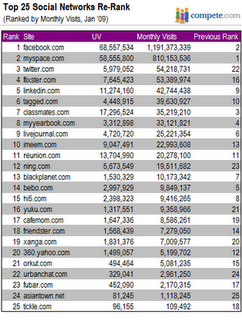
A year ago, we ranked the top 25 social networking sites by monthly visits, and I was curious to see how the positions would change if we re-ranked those same sites with the most recent figures
Top 25 social networking sites

Some key metrics in the health of a social network revolve around the activity of the user base – visits per unique visitor and time on site. While Facebook has excelled in both areas, MySpace has remained flat or fallen off, with new hot property Twitter climbing the ranks.
Sessions per month


Some key metrics in the health of a social network revolve around the activity of the user base – visits per unique visitor and time on site. While Facebook has excelled in both areas, MySpace has remained flat or fallen off, with new hot property Twitter climbing the ranks.


How to manually remove Trojan Horse

A Trojan, sometimes referred to as a Trojan horse, is non-self-replicating malware that appears to perform a desirable function for the user but instead facilitates unauthorized access to the user's computer system. 

Is trojan virus Dangerous?
The short answer is yes, and the long answer is sometimes, because there are near a thousand different trojan horse viruses and they all will most likely alter your computer in some way or another.

Working of Trojans!


In this tutorial i will tell you a method through which you can manually remove a Trojan horse,Sometimes  atrojan horse disables your antivirus and prevent any other Antivirus from being installed

1-Go to my computer
2-Drive c
3-Program Files
4-Common flies
5-Microsoft shared
6- Ms info or msinfo 32

 The virus might hide it self in startup so delete the temporarily internet file

Is there any way to prevent Trojan attack?

I have wrote an article on How to secure your network from trojans this will explain on How to keep Trojans out of your PC

How to make an excellent worm virus

What is a worm?
Worms are programs that replicate themselves from system to system without the use of a host file. This is in contrast to viruses, which requires the spreading of an infected host file. Although worms generally exist inside of other files, often Word or Excel documents, there is a difference between how worms and viruses use the host file. Usually the worm will release a document that already has the "worm" macro inside the document. The entire document will travel from computer to computer, so the entire document should be considered the worm W32.Mydoom.AX@mm is an example of a worm.

Step 1:
Go to notepad and type "startvirus.bat"

Step 2:

THen go to save as and nameit something like "virus.bat"
Step 3:
Now create shortcut so you can change icon so it looks more serious.
Step 4:
THen go to properties and change icon
Step5:
Now rename it and sent it to some one.

And you are done...


How to start windows xp faster

One of the best ways to help you start windows faster quickly is to reduce the number of programs scuh as msn,yahoo etc that are loaded while Windows is “waking up.”To tweak the startup, you must use a utility called msconfig, as follows:


Start windows faster - Method:


Step 1:
Click the Start button in the lower-left corner of Windows.


Step 2:
Click Run.


Step 3:
 A window opens.Type msconfig in the blank, and then click the OK
button or press the Enter key.

Step 4:
The System Configuration Utility window opens. Click the Startup
tab on the far right
.
Step 5:

In the Startup Item column on the left is a list of programs with
checkmarks next to them.A checkmark indicates
that the program is scheduled to launch each time Windows starts.To
prevent a program from loading at startup, remove the checkmark
from its box. Here are guidelines about which programs to allow or to
disable:
• Disable non-essential multimedia programs like qttask (which is
part of the QuickTime software), realsched (which is part of the
RealPlayer software), or Adobe Reader.
• Allow common processes for Windows and Microsoft Office.
• Allow programs related to your antivirus software, antispyware
software, or firewall. For example, if you use the ZoneAlarm fire-
wall and Spy Sweeper antispyware program, then you should
allow the startup programs named zlclient and SpySweeper.
• Allow programs related to your printer. For example, if you have
an Epson printer, then allow the startup program named Epson
Status Monitor.


Step 6:
 If you are uncertain about whether or not to disable a particular program, do the following:
a. Write the program’s name on a piece of paper.
b. Connect to the Internet.
c. In your Web browser, type http://www.processlibrary.com to
visit the Process Library.
d. Near the top of this website’s main page is a Search for a Process
search box.Type the name of your program into this box, and
then click the Search Now button.
You are taken to a Web page that explains what your program is
used for and whether or not it is essential to your computer’s
performance.


Step 7:
7. When you have finished tweaking the System Configuration Utility,
click the Apply button.


Step 8:
8.Click the OK button.


Step 9:
9. A message alerts you that you must restart your computer for the
changes to take effect. Click the Restart button.Your computer auto-
matically shuts down and reboots.


Step 10:
 When you return to Windows, a message alerts you that you have just
used the System Configuration Utility to change the way Windows
starts. Put a checkmark in the box labeled “Don’t show this message
or launch the system configuration utility when Windows starts
.”


Step 11:
Click the OK button.
By following these steps you wil realize that your windows no starts faster


.......

Saturday, December 18, 2010

How to open two orkut account in one tab

Today i will show you a trick to open two orkut accounts in one tab ,This trick needs Mozilla Firefox 3 and this was requested by lots of readers,so on readers demand i am posting this trick,kindly show your feed back by commenting


Open two orkut account in one tab - Trick

Step 1:
First open Firfox and then login to Orkut.

Step 2:
After logging in Open a new Tab in Firefox and click on close button of the browser

Step 3
You will get a Dialogue box Click on SAVE

Step 4:
Then again open Firefox, you can see you are still logged in
Then On your Orkut home page, scroll down and at the bottom you will see go to orkut.com


Now you can see a new login screen has come
Login with your second account and Enjoy :)

.......

How to rename recycle bin


How to rename recycle bin

Many people asked me to write a post about on Registry hacks,so here is the post on "How to rename recyclebin"

You can rename recycle bin by following method:


1-Click Start menu > Run > and type “regedit” (without quotes), to run Windows Registry Editor
2- Find and go to following “HKEY_CLASSES_ROOT/CLSID/{645FF040-5081-101B-9F08-00AA002F954E}”
3- Change the name "Recycle Bin" to whatever you want

Please Note :Incorrectly editing the registry may severely damage your system.


.......

Twitter Delicious Facebook Digg Stumbleupon Favorites More


Recent Posts

Join Me On Facebook

700+ Followers

Followers


meet women in Ukraine contatore visite website counter
DMCA.com

Recent Comments

Follow Me On Twitter

1112+ Followers