Dear Readers: HWS has recently started a new project for the students of engineering ====> The Engineering Projects


Write at HWS !!!

Guest Posting

How secure is your Computer ?

Check out your computer safety here . A lot of tools , tricks and hacks related to computer .

Blogger Tips and Tricks

A Lot of tips ,tricks and hacks related to blogger . Seo tricks to get maximum targetted traffic to your blog.

Easy ways to Earn Online

Online earning is not so difficult but it needs a lot of patience and hardwork. Here are some techniques to earn money through internet.

Facebook Tricks

A lot of facebook tips , tricks and hacks.It requires a lot of time but reading is must.

Pro Hacking

If you have knowledge about basic techniques then try this,but be careful as it is highly toxic.

Sunday, April 15, 2012

Scanning websites with Vulnerability master.

Hey guys... in this post m giving u a video which is made by Danial shaikh. He used a tool called Vulnerability Master to scan the web and very successfully scanned it! Enjoy


video


Thats all for this post.

Stay tuned ! And thank you !

Saturday, April 14, 2012

Write Anything in Your Facebook Status in Blue Link Style

In my previous post I have shared such a trick but soon it was blocked by facebook as they upgraded the site. Now I have found another script with which we can do the same thing easily lets check it out .We have seen that these days people usually tag different pages in comments and status in Facebook but usually its very difficult to find the related page which we want to tag, like once I want to tag a page some thing like "WHAT A SHIT??" but I didn't find it.So here's a simple trick to write whatever you want to write in blue link style to make fun of your friends ;->

Steps to Follow

  • Copy the following code and Paste this on your status or in your comment :

@[1: ]@@[1:[0:1: Your Text Here ]]

  • Replace "YOUR TEXT" with whatever you want to write in "BLUE"... " . 
NOTE : Works Only On Profile Walls Not in Groups.

Check the example

  • As an example check this :
  • When I paste this as my status :
  •  It appears like this ..... ;))
  •  Enjoy guys .... and don't forget to make comment .... :))

Thursday, April 5, 2012

How to do Post exploitation with metasploit


How to do Post exploitation with metasploit


Hey guys , how u been. this is a requested tutorial .
I made a tutorial before some days on how to hack a computer with metasploit . In this video i explained what else interesting things you can do after you break-in or in other words POST EXPLOITATION Techniques .
Hope you guys enjoy it .
There are some really cool things in the video ;-)

VIDEO


Guys plz comment and share and like .... thanks
Stay Tuned !!!!

SUBSCRIBE TO MY CHANNEL FOLKS :)


Copyright © 2012. All rights reserved by “Kumar Sourav"


Monday, April 2, 2012

Effective DoS /DDoS with slowloris


Effective DoS/DDoS with slowloris .


Hey guys how you been ? well if u ask about me ... i'll say " hahahaha.. " :D
anyway in this post i'll explain how to use slowloris.pl for DoS or DDoS attacks. Slowloris is very effective in DoS.

VIDEO


slowloris download


You can download slowloris.pl from HERE.


Hope you guys enjoyed it . Thanks for watching .
Stay Tuned !!!
(comment and like plz )


 Copyright © 2012. All rights reserved by “Kumar Sourav"


Thursday, March 29, 2012

Command Prompt Tricks+Hacks Premier | part 1 ~ HACK WITH STYLE

Wednesday, March 28, 2012

Command Prompt Tricks+Hacks Premier | part 1


Hey guys how you been ? Hope you rockin it ;-)
Its been requested to make post on Command prompt commands , usage and other tricks. So i'll cover this part in parts .
Anyway if you want to know how to get IP then i have already posted on that , here is the link

>>Get IP of remote PC


Basic commands


  • dir : it lists all the files and directory in current location
  • cd : it takes the control to specified path. eg- suppose you are at c:\> and you type command cd users\public then it'll take you to c:\Users\Public>
  • cd.. : it takes you one directory back
  • systeminfo : it gives you all the information like processor,speed,hotfixes,RAM,hard-disk etc
  • md  : it makes a folder of a name which u have to specify. eg md hello
  • color : sets the color of command prompt and its text
  • echo : it displays the message 
  • echo message >> name.txt : it saves the message you have written to a file ,in this case , name.txt. 

SHUTDOWN


you can use command shutdown with various parameter . eg >>shutdown /s

  • /l : it loggs you off
  • /s : it shutdowns the computer
  • /r : restarts the computer
  • /a : it aborts the shutdown. suppose you have used shutdown /s . it'll shutdown the computer in less then a minute and within that minute if you use shutdown /a then the shutdown process will be aborted
  • /p : turn offs the computer without any delay
  • /h : it hibernates the computer 
  • /s /c message : this combination shutdowns the computer with a message which you have to specify
  • /m : it is used to shutdown a remote computer but for that you have to know the login ID and Password of remote computer :-)

SPECAIL COMMANDS

THERE ARE TWO COMMANDS WHICH ARE HELPFUL IN EVERY SITUATION
  • HELP : THIS DISPLAYS ALL THE COMMANDS YOU CAN USE
  • command /? : this is used to get the information about the specified command . suppose you want to know about md then you have to type md /?  and it'll display the information about that command.


These are very basic commands remember these . In next post i'll start batch file programming.  batch files are really interesting :-)


Hope you enjoyed this .. thanks for reading :)
Stay Tuned !!!
(comment and like plz )


" Copyright © 2012. All rights reserved by “Kumar Sourav"

Saturday, March 17, 2012

Access any other computer over the internet.


(For google chrome users only)


Access other computers or allow another user to access your computer securely over the Internet
Chrome Remote Desktop Beta enables you to enlist the help of a trusted resource for help in diagnosing and resolving problems with your computer through the internet.  Using Chrome Remote Desktop you can share access to your computer with an individual you trust, who will then be able to view your computer screen and control your computer remotely, just as if they were sitting beside you helping in person.  Sharing is fully secured, access is given only to the specific person you identify, and only on a one-time basis. If you are an IT helpdesk professional, Chrome Remote Desktop provides you with a simple and secure means to troubleshoot and resolve problems with your users' systems without having to leave your desk.


Chrome Remote Desktop is fully cross-platform, so you can connect any two computers that have a Chrome browser, including Windows, Linux, Mac and ChromeOS machines.  

                                         Get Chrome Remote Desktop Beta

I hope you guys enjoy it  :)

Regards,
Sheharyar Sikandar

Friday, March 16, 2012

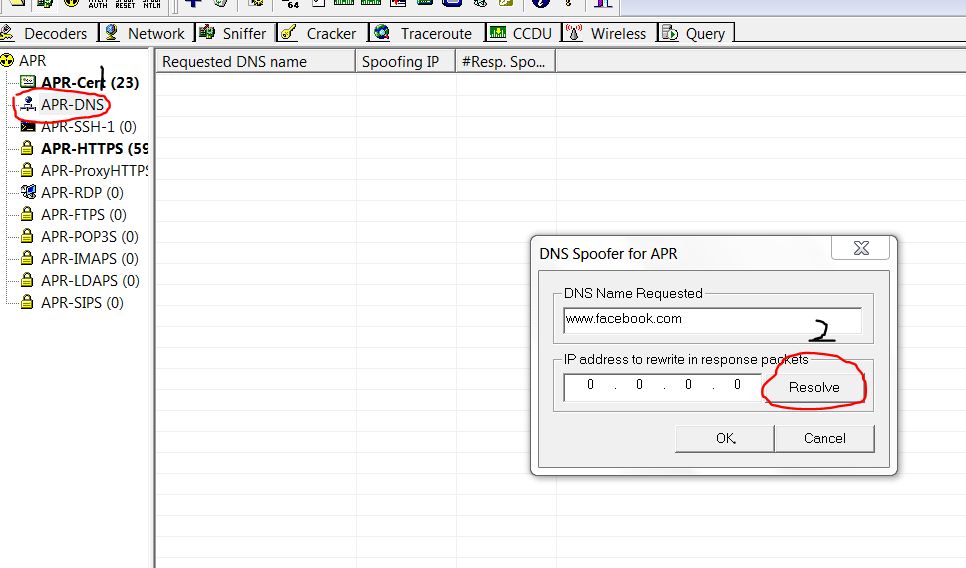
ARP-DNS Spoofing Attack using Cain & Abel.


Hey guys today i'm writing a very simple and interesting tutorial on DNS spoofing or poisoning attack using Cain & Abel.

DNS SPOOFING

DNS spoofing or DNS cache poisoning is a computer hacking attack in which data is introduced into a Domain Name System(DNS) name servers cache database, which causes the name server to return to an incorrect ip address, diverting traffic to another computer.
In simple words, it redirects the traffic to another website.


For example the victim wants to open www.facebook.com but is redirected to www.myspace.com

CAIN & ABEL

                                                                   Download Here

TUTORIAL


  • Install Cain & Abel and open it, go to configure and select your adapter.


  • Select Sniffer option and then select the start/stop sniffer option from the toolbar. Right click in the white area and then click on scan MAC addreses. 


  • After scanning click on the APR option in the left bottom corner. Then click on the + sign in the top and select the computers you want to mess with.


  • After that select APR-DNS and again click on + sign to add websites. (Now here i have entered www.facebook.com), then click on resolve and type the website name that  you want to open up instead of www.facebook.com. (i have given www.myspace.com)


  • Now click on the start/stop option. 

  • Now wait for a minute and see what happens to the victim. (In my case when the victim will open www.facebook.com he will be redirected to www.myspace.com). You can use any websites of your choice.


VIDEO TUTORIAL


So this is it guys, hope you like it, comment for any queries  :)


Regards,
Sheharyar Sikandar

Twitter Delicious Facebook Digg Stumbleupon Favorites More


Recent Posts

Join Me On Facebook

700+ Followers

Followers


meet women in Ukraine contatore visite website counter
DMCA.com

Recent Comments

Follow Me On Twitter

1112+ Followers